
When you are going to reconcile VAT and you have more than 1 settlement account in the balance sheet, you must define which accounts you are going to reconcile. If you have already reconciled, for example, ordinary business, this question will appear:

Here you should answer yes.
This pop-up will then appear:
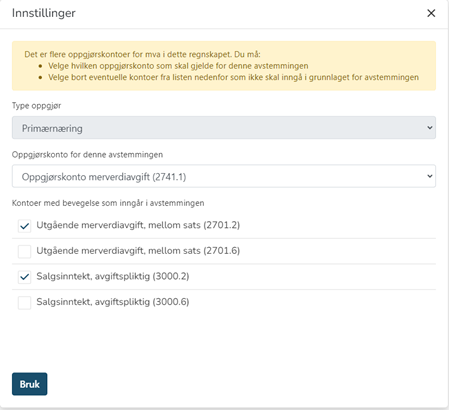
Here it is important that you choose which settlement account the reconciliation should apply to and which turnover accounts should be reconciled. This pop-up will appear when you select both ordinary industry and primary industry. Select the correct settlement account in the drop-down menu. Then select which accounts belong to the settlement account. If you select a settlement account for primary industry, you must also select the sales accounts that apply to primary industry.
At the top of the reconciliation you will find 3 tabs:
- The first tab shows the reconciliation for the period.
- The second tab shows a total overview for the year, both booked and submitted VAT.
- The third tab shows account help, where you can see which accounts we support in the reconciliation. These accounts can be mapped correctly under "Edit chart of accounts".
Settlement
Here you will find an overview of outgoing and incoming VAT, retrieved from the ERP system (27xx accounts). You should not enter any numbers here.
Basic outgoing tax
All booked amounts in the account series 3000-3999 will automatically be entered here. Note that the sale will have a positive sign, while the credit will be shown with a negative sign.
If you have not posted with "pure" accounts, but have posted both with and without VAT on the same account, you can correct this by clicking on the pencil in front of the account.
In the line with the account number like the one you clicked on, you can correct the amount to the correct column:

If you have posted a sale with output VAT that is not linked to a 3xxx account, which causes you to have discrepancies in the reconciliation, you can click the "Add new correction" button:

Here you can enter the account that forms the basis for output VAT.
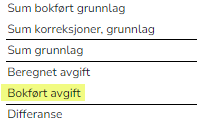
The line "Booked tax" will automatically be retrieved from the ERP system:
VAT notification
Amounts are currently entered manually, as we have received notification from the Norwegian Tax Administration that they have downgraded the work with the API to collect data from new VAT notifications in the ID port. Sales are entered with a positive sign and purchases with a negative sign.
Manual reconciliation
Here you enter the date, voucher number and amount paid/received from the Norwegian Tax Administration.
The balance in "Booked VAT credit/liable" comes automatically from account 2740.
Click on "Update balance on settlement account" if the balance in 2740 differs from the balance in the trial balance:
This is done after the reconciliation has been saved, so you must then retrieve the reconciliation for the correct period and enter the numbers there. Remember to press the button "Update balance on settlement account" - NOT the button "Retrieve basis" (see below)
NOTE!
When you reconcile BEFORE you submit the VAT return from the ERP system, you can update the reconciliation if you have made changes in the ERP system. Then use this button:
If you update the saved VAT reconciliation AFTER you have submitted the VAT return from the ERP system, the numbers will update and you will have to reconcile again - see "AFTER submitted VAT return".
─