
How to access Sticos Personal
Once your company has purchased Sticos Personal, you can ask your manager to create a user account for you. Your user profile must be registered with an email address, which can easily be your private address. If you already use other Sticos or Visma products, it is highly recommended to use the exact same login. If you are unsure, ask your manager to check which email address has been used previously.
Logging In to Sticos Personal
When your user profile is created, you will receive an invitation via email. This email contains a link that you must click on to set up your username. If you do not click this link, you will not be able to log in.
If you do not receive this email within a few seconds, it may either be caught in your spam filter, or the administrator might have misspelled your email address. Please check your spam folder, and ask your manager to verify which email address was used in the License Overview (Lisensoversikten).
Do you already have a Sticos or Visma product? If so, this box will appear when you click the link in the invitation:
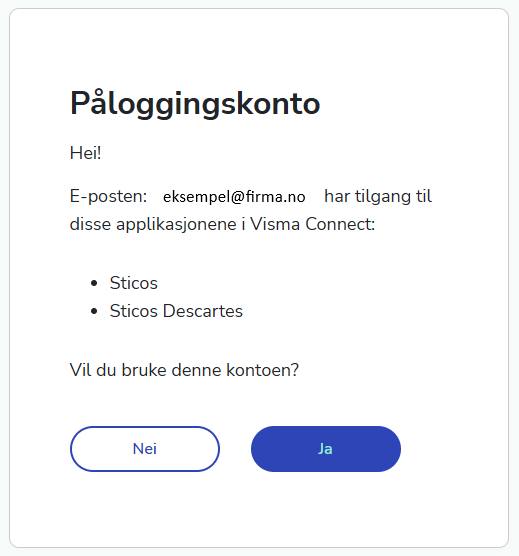
Click Yes (Ja) when asked to use this account, ensuring your user profile is correctly synched.
After creating your user profile, you can log in to Sticos Personal.
URL: handboker.sticos.no
(If your company has purchased Single Sign-On (SSO), your login link will be different. Please check with your manager to see if SSO has been set up)
Handbooks
Sticos Personal supports both English and Norwegian. You can easily switch the system language to English by clicking the language selection option in the top right corner.
Now that you have logged in to Sticos Personal, you can start exploring your company’s procedures. Sticos Personal consists of the Employee Handbook, Manager Handbook, HSE Handbook, and HSE Tools. Not all companies purchase every module, but you will find at least one of these handbooks available.
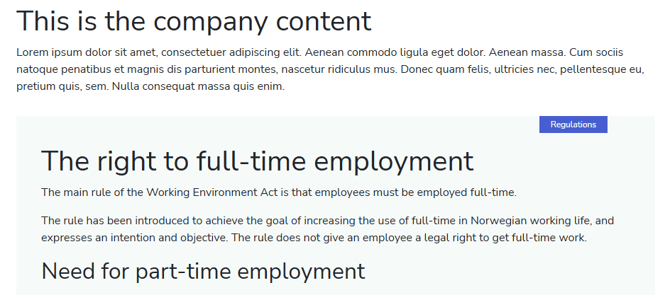
The handbooks consist of Sticos’ own expert content, which is an interpretation of Norwegian regulations (the Working Environment Act / Arbeidsmiljøloven). For many topics, you will also find your company's specific procedures. You can easily distinguish between official regulations and your company's custom content. If the company has added its own content, it will appear at the top with a white background. Regulatory text has a light green background and a blue tag labeled Regulations.
Ask Zipp Anything! 
No matter where you are in Sticos Personal, you can always find the AI assistant Zipp in the top right corner.
You can ask Zipp about anything regarding legislation or your company's own procedures. While many AI assistants invent answers when they don't know something (hallucination), Zipp is programmed to refrain from answering if it lacks the information:
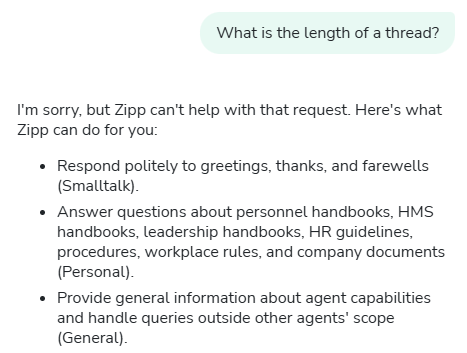
Zipp provides the best results when you ask questions using full sentences. The more specific you are, the more specific your answer will be. Give it a try!
Zipp understands you even if you make a typo. If you write in English or another language, you will receive an answer in that same language.
Document Archive
Under the Documents menu item, you will find documents that your company has chosen to make visible. Typically, these will be documents most relevant to your employment or those frequently used in company routines. You can favorite documents that you use often.
Can't find any documents? Ask your manager to adjust the visibility settings so that you and your colleagues can access them!
HSE (Health, Safety, and Environment)
If your company has purchased the HSE module, you will see the HSE Tools menu item:
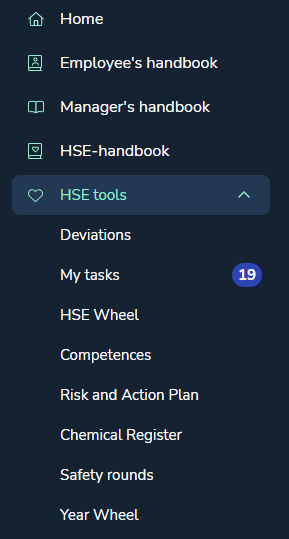
A standard user (a user without admin roles or extended privileges) can review all the tools to see that the company is keeping up to date, as well as contribute to ensuring that HSE regulations are followed. In fact, as an employee, this is not just a right, but a duty! This is known as the Employee's duty to participate, which you can read more about in the HSE Handbook.
A standard user can submit deviations themselves. Depending on your company's setup, you may have access to submit different types of deviations, but as a minimum, you will have the ability to report an HSE incident.
What is a deviation? A deviation or non-conformity (avvik) is an undesirable event or a failure to meet requirements (for example, a procedure that was not followed, lack of safety equipment usage, insufficient information, etc.).
Keep an eye on the Risk and Action Plan and check that your company has conducted a risk assessment this year, that various measures have been evaluated, and that nothing is missing. Check the HSE Wheel to see that your company has completed an HSE review this year, and read the summary of the latest safety round (vernerunde). If your company uses chemicals, you should be able to find them in the Chemical Register (Stoffkartotek).
You can raise the issue with your manager if you feel something is missing.
You can upload your own course certificates, credentials, work experience, or education history under Competences. You can also upload a photo to generate a CV summary.
If you are assigned a task in Sticos Personal, you will receive both an email notification and a task in My Tasks. A task could, for example, be an assigned measure connected to a deviation, a risk assessment, or something else. Tasks always have a deadline, and you will also receive email reminders.
Best of luck!